Mostrando postagens com marcador Backend Development. Mostrar todas as postagens

PHP Data Types Explained: Integers, Floats, Strings, and Booleans

In this guide of our Progressive PHP Course, we will explore the fundamental Data Types: numbers, text, logical states, and the complex structures you will use daily in your backend projects.

Numeric Types: Integers and Floats

Math is the foundation of computing. Practically everything your script does under the hood involves high-performance numerical processing. In PHP, we work with two main groups of numbers:

1. Integers

As the name implies, these are whole numbers without a decimal point. They are perfect for counting items, user IDs, and array indexes.

  • Positive: 10, 500, 12345
  • Negative: -15, -100
  • Zero: 0
<?php
    echo 2026; // This is an Integer
?>

2. Floats (Floating Point Numbers / Doubles)

These are decimal numbers, often referred to as "fractions" or "broken numbers." Crucial rule: In programming, we follow the international standard. We use a dot (.) for decimals, never a comma.

  • Examples: 1.99 (prices), 4.5 (ratings), 0.007 (scientific precision)
⚙️ Technical Note: PHP also allows you to represent numbers in alternative bases, such as Octal (base 8, starts with 0), Hexadecimal (base 16, starts with 0x), and Scientific Notation (e.g., 6.0e+23).

Logical Type: Booleans

The heart of programming logic is binary. The Boolean type represents the smallest unit of decision-making in your code. It accepts only two possible states:

  • TRUE
  • FALSE

In PHP, certain values are automatically evaluated as false in logical tests (we call these "falsy" values): the integer 0, the float 0.0, an empty string "", or the NULL value. Practically everything else evaluates to TRUE. Mastering this concept is the key to creating smart, conditional algorithms.

Text Type: Strings

Strings are sequences of characters used to represent names, messages, or alphanumeric data. They must always be wrapped in quotes (single ' ' or double " ").

  • Flexibility: A string can be a single letter ('a'), a word ("PHP"), or a massive paragraph of text.
  • The Crucial Difference: Remember that 10 is a number (it can be mathematically processed), while "10" is a string (it is processed as a text character).
<?php
    echo "Welcome to the Progressive PHP Course!"; // This is a String
?>

Advanced & Compound Data Types

As we progress in our course, you will encounter types that group information in much more complex ways. Here is a sneak peek:

  • Array: An organized list that holds multiple values in a single structure.
  • Object: The foundation of Object-Oriented Programming (OOP), representing real-world entities.
  • NULL: A special type that explicitly represents a variable with absolutely no value.
  • Resource: Special variables that hold references to external resources, like database connections or open files.

📌 Lesson Takeaway:

In this introduction, you learned that PHP categorizes information to ensure performance and security. Knowing that a price must be a Float and a username must be a String will prevent critical bugs in your future systems.

Quick question for you: What data type would you use to store a user's Age? Let me know in the comments below!


What's Next? Declaring Variables!

Now that you know the different types of data, it's time to learn how to store them in your computer's memory. In the next tutorial, we will finally create Variables, the ultimate building blocks of any PHP application.

Go to the Next Lesson in the Syllabus →
PHP Practice Exercises: Mastering Echo, Output, and HTML Integration

Below, I have prepared a list of 10 practical challenges to train your syntax, logic, and HTML integration in PHP. Try to solve all of them without copying and pasting! Open your text editor, start your XAMPP server, and let's get to work.


The Exercise List: PHP Output & Syntax

Challenge 1: The Classic Phrase
Create a PHP script that outputs the following phrase to an HTML document: "The first program we write, we never forget!".
Challenge 2: Digital Business Card
Develop a script that prints your full name on the first line, your address on the second line, and your ZIP code and phone number on the third line. Use HTML tags inside your PHP strings to organize the line breaks.
Challenge 3: The Playlist
Write a script that outputs the chorus of your favorite song to the screen.
(Hint: You will need multiple `<br />` tags to separate the verses properly!)
Challenge 4: Surprise Message
Implement a PHP page that prints a funny or special message. Take a screenshot of the browser output and send it to a friend saying you built a "creative virus" that infected your localhost!
Challenge 5: Developer Goals
Create a program that displays a bulleted list (using HTML `<ul>` and `<li>` tags inside your `echo`) of what web apps or systems you intend to build once you master PHP.
Challenge 6: ASCII Art (The Square)
Write a program that produces the following geometric figure in the browser using uppercase 'X':
XXXXX
X   X
X   X
X   X
XXXXX
Challenge 7: The Grade Report
You were hired by a school. As your first task, develop a script that generates exactly the following text-based table:
STUDENT           GRADE
=========         =====
ALICE             9.0  
MARIO             TEN
SERGIO            4.5   
SHIRLEY           7.0
Challenge 8: Stylized Initial
Create a script to print the letter "P" (for PHP Progressive) on the screen using characters. Use the letter "L" below as an inspiration for the format:
L
L
L
LLLLL
Challenge 9: CLI-Style Menu
Simulate a terminal-based customer registration menu with the following visual structure:
Customer Management System
0 - Exit
1 - Create
2 - Update
3 - Delete
4 - Read
Select an option: _
Challenge 10: The Christmas Tree
Implement a program that draws a "pine tree" on the screen. Try using different characters (like `*`, `O`, `+`) to simulate ornaments on the tree!
        X
       XXX
      XXXXX
     XXXXXXX
    XXXXXXXXX
   XXXXXXXXXXX
  XXXXXXXXXXXXX
 XXXXXXXXXXXXXXX
        XX
        XX
       XXXX

💡 Master Tips for ASCII Art:

  • To keep your drawings (like the pine tree and the table) perfectly aligned in the browser, wrap your PHP output inside an HTML <pre> (Preformatted Text) tag.
  • Practice using both single quotes (') and double quotes (") to feel the difference.
  • Never forget the mandatory semicolon (;) at the end of each statement!

I'm waiting for your source code in the comments! Which exercise was the most challenging for you?


What's Next? Variables and Data Types!

Printing hardcoded text is fun, but real applications need to store, manipulate, and process dynamic information. In our next tutorial, you will learn the most fundamental concept in programming: Variables. This is where your code truly starts to "think."

Go to the Next Lesson in the Syllabus →

What is PHP? The Ultimate Guide to the Engine Powering the Web

🤔 What is PHP and what is it used for?

The Short Answer: PHP (a recursive acronym for PHP: Hypertext Preprocessor) is an open-source, interpreted programming language designed primarily for server-side web development. It is used to create dynamic websites, manage databases, process forms, and build complex web systems—acting as the foundation for giants like Facebook and WordPress.

Hey there, future developer! Welcome to the starting line of your coding journey. In this first tutorial of our Progressive PHP Course, we’re going to demystify the language that serves as the "engine" of the modern internet. We will explore its history, how it processes information, and why it remains the #1 choice for backend development in 2026.

Grab your coffee, pull up a chair, and let’s get into it!

PHP in Practice: More Than Just Scripts

If you're just starting out, the term "Scripting Language" might sound a bit technical. Think of a programming language as the bridge between your logic and the computer's hardware. PHP is a language specifically built to give instructions that a web server can understand and execute.

Unlike languages like C++ or Java, PHP is interpreted. This means there is a module on the server that reads your code and executes it on the fly. You don't need to "compile" it into a complex executable file before seeing the results in your browser.

💡 Pro Tip:

The "secret sauce" of PHP is Dynamic Content Generation. While raw HTML is "static" (it stays the same unless someone manually changes the file), PHP decides what to display based on who is logged in, what time it is, or data retrieved from a database.

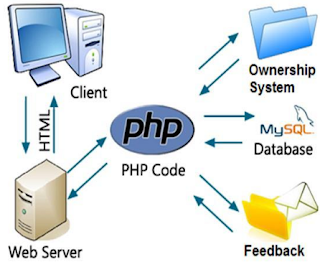
Infographic: How PHP works on the server side

How PHP Works: Server-Side vs. Client-Side

Imagine you're checking a friend's profile on a social network. That photo isn't stored "inside" your browser; it lives on a Server (a powerful computer located somewhere in the world).

When you click a link, here is the behind-the-scenes workflow:

  1. Your browser sends a Request to the server.
  2. PHP kicks in on the server, fetches the specific photo and user data from a database.
  3. It assembles a custom HTML page and Responds back to your browser.

While JavaScript usually runs on the client-side (inside your browser), PHP does the heavy lifting in the background—this is what we call Backend Development.

Where is PHP Used? (The King of the Web)

Did you know that over 75% of all websites run on PHP? It is everywhere. If you use WordPress, you're using PHP. If you read Wikipedia, you're using PHP.

The ultimate proof of power is Facebook. Serving billions of users simultaneously, Facebook was built on PHP and proved that the language can scale to global proportions. Other tech giants using PHP include Tumblr, Slack, and massive E-commerce platforms like Magento and WooCommerce.

⚠️ Common Myth:

You might hear people say "PHP is dead," but the data says otherwise. The market for developers who master Modern PHP (8.x+) is incredibly active, offering some of the most stable career paths and lucrative freelance opportunities in the industry.

What Can You Build with PHP?

The possibilities are virtually endless, but here are the industry standards:

  • E-commerce Systems: Shopping carts, shipping calculators, and payment gateway integrations.
  • Content Management Systems (CMS): Custom blog platforms and membership areas.
  • Database Integration: Creating, Reading, Updating, and Deleting data (the famous CRUD) with high security.
  • API Development: Creating endpoints to feed data to mobile apps.

A Bit of History

PHP was born in 1995, created by Rasmus Lerdorf. It started as a simple set of tools called Personal Home Page Tools. Today, it has evolved into a robust, cross-platform powerhouse that runs on Windows, Linux, macOS, and even specialized web servers.


What’s Next?

Now that you know what PHP is, the next step is to prepare your workspace. In our next tutorial, we will set up your Local Development Environment. This is a crucial step because you cannot run PHP files just by double-clicking them—you need a server environment, and we will show you exactly how to do it for free.

Veja também: