Mostrando postagens com marcador Coding for Beginners. Mostrar todas as postagens

What is PHP? The Ultimate Guide to the Engine Powering the Web

🤔 What is PHP and what is it used for?

The Short Answer: PHP (a recursive acronym for PHP: Hypertext Preprocessor) is an open-source, interpreted programming language designed primarily for server-side web development. It is used to create dynamic websites, manage databases, process forms, and build complex web systems—acting as the foundation for giants like Facebook and WordPress.

Hey there, future developer! Welcome to the starting line of your coding journey. In this first tutorial of our Progressive PHP Course, we’re going to demystify the language that serves as the "engine" of the modern internet. We will explore its history, how it processes information, and why it remains the #1 choice for backend development in 2026.

Grab your coffee, pull up a chair, and let’s get into it!

PHP in Practice: More Than Just Scripts

If you're just starting out, the term "Scripting Language" might sound a bit technical. Think of a programming language as the bridge between your logic and the computer's hardware. PHP is a language specifically built to give instructions that a web server can understand and execute.

Unlike languages like C++ or Java, PHP is interpreted. This means there is a module on the server that reads your code and executes it on the fly. You don't need to "compile" it into a complex executable file before seeing the results in your browser.

💡 Pro Tip:

The "secret sauce" of PHP is Dynamic Content Generation. While raw HTML is "static" (it stays the same unless someone manually changes the file), PHP decides what to display based on who is logged in, what time it is, or data retrieved from a database.
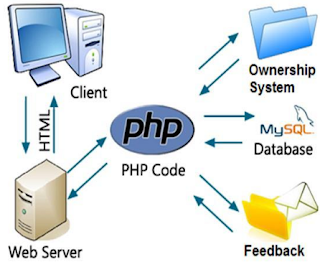
Infographic: How PHP works on the server side

How PHP Works: Server-Side vs. Client-Side

Imagine you're checking a friend's profile on a social network. That photo isn't stored "inside" your browser; it lives on a Server (a powerful computer located somewhere in the world).

When you click a link, here is the behind-the-scenes workflow:

  1. Your browser sends a Request to the server.
  2. PHP kicks in on the server, fetches the specific photo and user data from a database.
  3. It assembles a custom HTML page and Responds back to your browser.

While JavaScript usually runs on the client-side (inside your browser), PHP does the heavy lifting in the background—this is what we call Backend Development.

Where is PHP Used? (The King of the Web)

Did you know that over 75% of all websites run on PHP? It is everywhere. If you use WordPress, you're using PHP. If you read Wikipedia, you're using PHP.

The ultimate proof of power is Facebook. Serving billions of users simultaneously, Facebook was built on PHP and proved that the language can scale to global proportions. Other tech giants using PHP include Tumblr, Slack, and massive E-commerce platforms like Magento and WooCommerce.

⚠️ Common Myth:

You might hear people say "PHP is dead," but the data says otherwise. The market for developers who master Modern PHP (8.x+) is incredibly active, offering some of the most stable career paths and lucrative freelance opportunities in the industry.

What Can You Build with PHP?

The possibilities are virtually endless, but here are the industry standards:

  • E-commerce Systems: Shopping carts, shipping calculators, and payment gateway integrations.
  • Content Management Systems (CMS): Custom blog platforms and membership areas.
  • Database Integration: Creating, Reading, Updating, and Deleting data (the famous CRUD) with high security.
  • API Development: Creating endpoints to feed data to mobile apps.

A Bit of History

PHP was born in 1995, created by Rasmus Lerdorf. It started as a simple set of tools called Personal Home Page Tools. Today, it has evolved into a robust, cross-platform powerhouse that runs on Windows, Linux, macOS, and even specialized web servers.


What’s Next?

Now that you know what PHP is, the next step is to prepare your workspace. In our next tutorial, we will set up your Local Development Environment. This is a crucial step because you cannot run PHP files just by double-clicking them—you need a server environment, and we will show you exactly how to do it for free.

Setting Up Your PHP Development Environment: XAMPP, Apache & MySQL Guide

PHP Environment Setup: Building Your Local Dev Server

Before we dive into the code, we need a place for it to live. Learn how to transform your computer into a professional local server using XAMPP.

🤔 What do I need to start programming in PHP?

Direct Answer: To run PHP locally, you need a "WAMP" or "XAMPP" stack consisting of an Apache web server, a MySQL database, and the PHP interpreter. Installing a cross-platform tool like XAMPP is the fastest way to get all three running on Windows, Linux, or macOS without complex manual configurations.

Now that we’ve explored what PHP is and why it dominates the web, it's time to get our hands dirty. But wait—you can't just double-click a PHP file and expect it to work in your browser like an image or a text file. You need a Server.

The Client-Server Dialogue

Every website you visit lives on a specialized computer called a Server. When you browse the web, your browser (the Client) starts a technical conversation:

Client: "Hey Server, I want to see your homepage. Send me the data."

Server: "Copy that! Here is the HTML, CSS, and the images."

Client: "Got it! Now, can you process this login form for me?"

Server: "One second while I check the database... Access granted. Sending your dashboard."

Since PHP is a Server-Side language, it lives exclusively on the server. Instead of buying a real server or paying for hosting right now, we are going to do something much smarter: Turn your own PC into a PHP Server!

Why develop locally?

  • Speed: No internet lag. Everything happens at your hardware's speed.
  • Safety: You can make mistakes, break things, and experiment without exposing your site to the public internet.
  • Offline Access: You can code on a plane, a train, or in a basement with zero Wi-Fi.

The Power Trio: Apache, MySQL, and PHP

To build a modern web environment, you need these three pillars:

  • Apache: The HTTP server that handles requests and simulates the web environment (localhost).
  • MySQL: The database system that stores user data, passwords, and site content.
  • PHP: The interpreter that processes your logic and generates dynamic HTML.

🛠️ Don't Get Confused by Acronyms!

You might see terms like WAMP (Windows), MAMP (Mac), or LAMP (Linux). They are just installers tailored for each OS. We recommend XAMPP because it's Cross-platform (X) and works perfectly on everything.

How to Install and Configure XAMPP

XAMPP is the industry standard for local development. It includes extra tools like FileZilla (for FTP) and Mercury. Follow these steps:

  1. Visit the official site: apachefriends.org.
  2. Download the latest stable version for your OS.
  3. Run the installer. Keep all components checked for a complete experience.
  4. Pro Tip: Install it in a simple directory to avoid permission issues:
    • Windows: C:\xampp
    • Linux: /opt/lampp
Installing XAMPP for PHP development

After installation, open the XAMPP Control Panel and click Start next to Apache and MySQL. Once they turn green, you are officially a server owner!

Testing Your Setup

Open your browser and type one of these addresses:

  • http://localhost
  • http://127.0.0.1

If you see the XAMPP welcome page, congratulations! Your backend journey has officially begun.


Choosing Your Weapon: Text Editors & IDEs

While you could use Notepad, don't do that to yourself. To learn effectively, you need a balance between "doing it manually" and having a clean interface. Here is our recommendation:

  • VS Code (Highly Recommended): Light, powerful, and the industry favorite.
  • Sublime Text: Extremely fast for quick scripts.
  • PHPStorm: The "Ferrari" of IDEs (Paid, but great for pros).

A Programmer's Advice: In the beginning, avoid "auto-complete" plugins. Type every semicolon, every bracket, and every variable manually. Muscle memory is the fastest way to internalize the PHP syntax. Write it, break it, fix it.

Ready for the next step?

Now that your server is live, it's time to write your very first script.

🏆 View Full Course Roadmap →

Veja também: